

I was mass-approving every permission prompt Claude threw at me. Every. Single. Time. "Allow bash?" Yes. "Allow read?" Yes. "Allow write?" Yes yes yes. It was like clicking through a terms of service agreement 50 times a day.
Then I discovered the .claude/ folder and realized Ive been doing it all wrong. Not just the permissions thing - everything. Claude was basically working blind on my projects because I never told it how my codebase actually works.
Let me save you the weeks of trial and error.
The Mental Model: Two Layers of Config
Most people dont realize theres two separate places Claude looks for instructions. Think of it like git config - you have global and local.
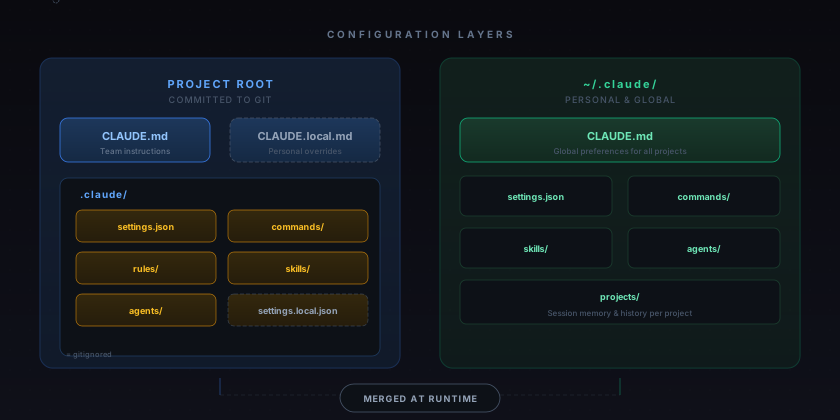
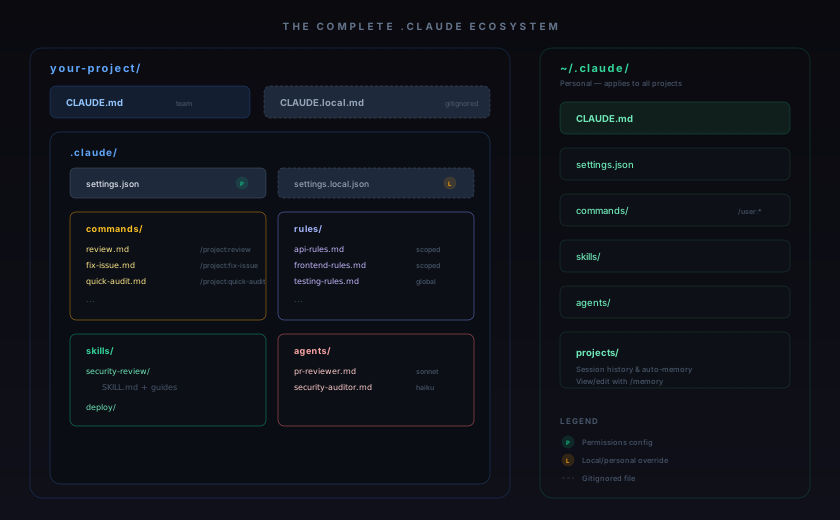
Your global config (~/.claude/) follows you everywhere. Your project config (.claude/ in the repo) is shared with the team via git. They merge together at runtime, with project-level taking priority.
Step 1: The CLAUDE.md File (Start Here)
Forget everything else. If you only do one thing, write a good CLAUDE.md in your project root. This is the file Claude reads first, every single session.
The mistake I see everyone make? Writing a novel. Claudes instruction adherence drops noticeably past 200 lines. Keep it tight.
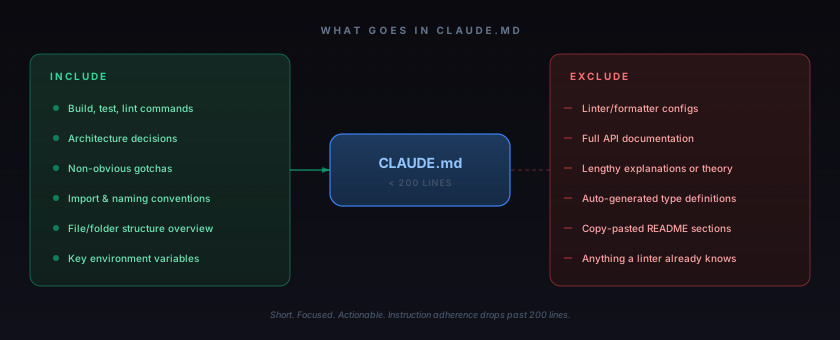
Heres what I actually put in mine for a NestJS project I work on:
# Project: Logistics API

## Commands
pnpm dev              # Start with hot reload
pnpm test             # Vitest (uses real Postgres)
pnpm lint             # Biome check
pnpm db:migrate       # Run Drizzle migrations

## Stack
- NestJS 11, Node 22, TypeScript strict
- Drizzle ORM with PostgreSQL
- BullMQ for background jobs
- All modules follow Clean Architecture

## Rules
- Every endpoint needs a Zod DTO
- Response shape: { data, error, meta }
- Use the LoggerService, never console.log
- Background jobs go in src/jobs/, not in controllers

## Gotchas
- Auth middleware reads from Redis, not JWT
- Rate limiter is per-tenant, not per-user
- Tests share a DB - use transactions for isolation
Thats it. 25 lines. Claude now knows more about my project then most new hires do on their first week.
Step 2: Stop Clicking "Allow" - Use settings.json
This was the game changer for me. Instead of approving every single bash command, you tell Claude upfront whats okay and whats not.
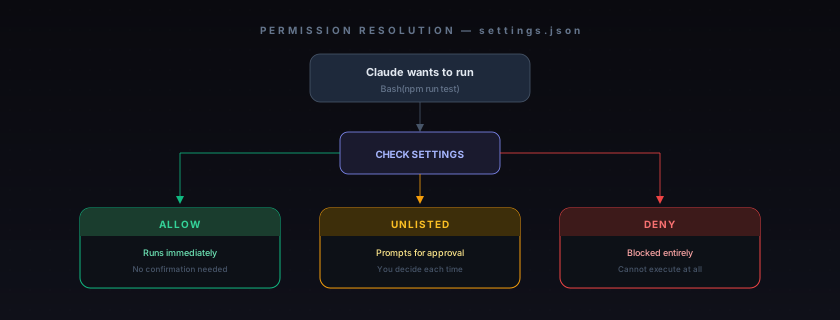
My settings.json looks like this:
{
  "permissions": {
    "allow": [
      "Bash(pnpm *)",
      "Bash(git status)",
      "Bash(git diff *)",
      "Bash(git log *)",
      "Read",
      "Write",
      "Edit",
      "Glob",
      "Grep"
    ],
    "deny": [
      "Bash(rm -rf *)",
      "Bash(git push *)",
      "Bash(git reset --hard *)",
      "Read(./.env)",
      "Read(./.env.*)"
    ]
  }
}
I let Claude run tests, lint, and read/write files freely. But it cant delete my repo, force push, or read my secrets. The stuff in between (like installing packages) still triggers a prompt. Perfect balance.
Theres also settings.local.json for personal overrides that dont get committed. Same idea as CLAUDE.local.md vs CLAUDE.md.
Step 3: Custom Slash Commands (My Favorite Feature)
Every markdown file in .claude/commands/ becomes a slash command. I have three that I use literally every day.
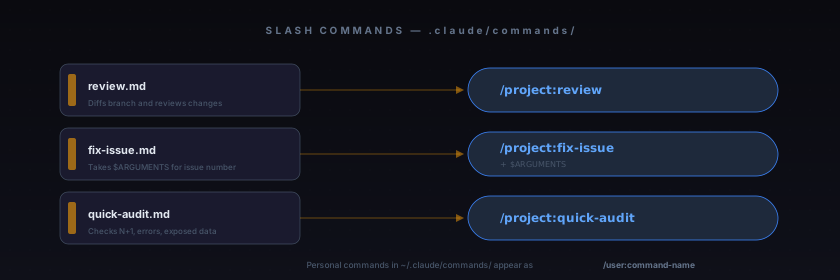
The secret sauce is the ! backtick syntax. It runs shell commands and feeds the output directly into the prompt:
---
description: Review current branch before merging
---
## Whats changed

!`git diff --stat main...HEAD`

## Full diff

!`git diff main...HEAD`

Review these changes. Focus on:
1. Bugs and logic errors
2. Security issues (SQL injection, exposed secrets)
3. Missing error handling
4. Tests that should exist but dont

Be specific. Show me the line numbers.
When I type /project:review, Claude gets the actual diff injected into the prompt. No copy-pasting. No "can you look at my changes?" back and forth.
For commands that take input, use $ARGUMENTS:
---
description: Fix a GitHub issue end-to-end
argument-hint: [issue-number]
---
Heres the issue:

!`gh issue view $ARGUMENTS --json title,body,labels,comments`

1. Understand the bug from the description and comments
2. Find the root cause in the code
3. Fix it
4. Write a regression test
5. Summarize what you did
Now /project:fix-issue 127 is a one-liner that goes from bug report to fix. Ask me how I know this saves hours.
Step 4: Rules That Activate Based on File Path
When my CLAUDE.md started getting long, I moved specific concerns into .claude/rules/. But the real power is path-scoped rules.
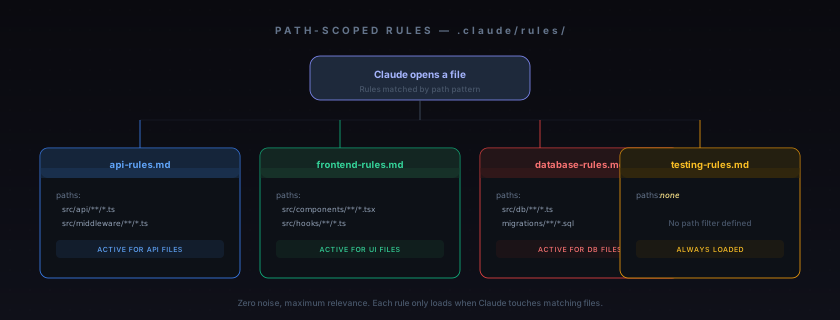
My api-rules.md:
---
paths:
  - "src/api/**/*.ts"
  - "src/middleware/**/*.ts"
---
# API Layer Rules

- Every route handler must validate input with Zod
- Response format is always { data, error, meta }
- Never return raw database entities - map to DTOs
- Rate limiting is per-tenant (check X-Tenant-ID header)
- Log every 4xx/5xx with request context
Claude only sees these rules when it touches API files. When its working on the frontend, it gets different rules. Zero noise, maximum relevance.
Step 5: Skills vs Agents (They Sound Similar But Arent)
This confused me for a while. Both live in .claude/ but they work very differently.
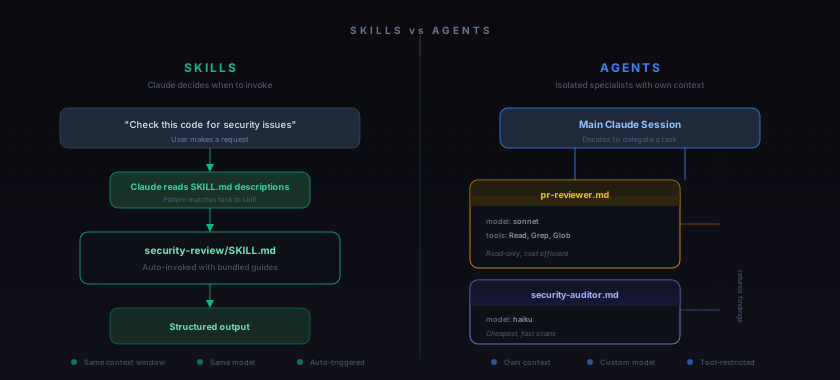
Skills are workflows that Claude triggers automatically when it recognizes the task matches. You create a SKILL.md with a description, and Claude decides when to use it.
Agents are like hiring a specialist. They get their own context window, their own tools, and even their own model. Want code reviews done by Sonnet to save costs? Set model: sonnet in the agent definition. Want an agent that can only read files but never write? Set tools: Read, Grep, Glob.
Agent example I actually use:
---
name: pr-reviewer
description: Reviews pull requests for correctness,
  security, and maintainability before merging.
model: sonnet
tools: Read, Grep, Glob
---
You are a senior engineer reviewing a PR. Focus on:
- Correctness: will this actually work in production?
- Security: any injection, auth bypass, or data exposure?
- Edge cases: what happens with empty input, duplicates, timeouts?
- Test coverage: are the important paths tested?

Skip style nits. I have a linter for that.
This agent runs on Sonnet (cheaper), can only read code (cant accidentally modify anything), and focuses purely on finding real issues. Its like having a senior dev on call for every PR.
The Full Picture
Heres everything laid out:
My Setup Progression (Steal This)
Dont try to configure everything in one sitting. Heres the order that worked for me:
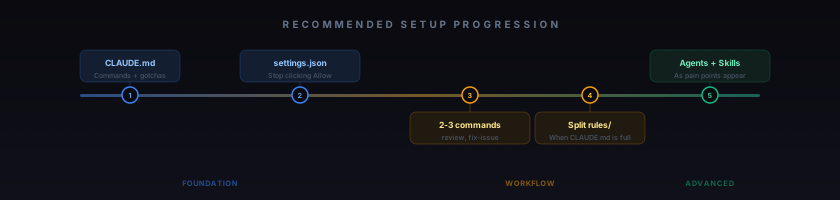
- Week 1: Write a lean CLAUDE.md. Just your build commands, stack, conventions, and gotchas.
- Week 2: Add settings.json. Your wrist will thank you for not clicking "Allow" 200 times a day.
- Week 3: Create your first 2-3 commands. Code review and issue fixing are the highest ROI.
- Week 4+: Add rules and agents as specific pain points come up. Dont pre-optimize.
The biggest lesson? Claude Code isnt magic - its a tool that gets dramatically better when you tell it how you work. The .claude/ folder is how you have that conversation.